
On this page
What local SEO is
For a restaurant, a clinic, a law firm or a contractor, the searches that matter most come with local intent, stated or not: “emergency plumber”, “orthodontist near me”, “plumber [city]”. Google answers many of them with a map and a short list of businesses, the local pack, before any ordinary result.
Getting into that list depends on three things Google names itself:
You can't move your address, but you can make the other two work for you.
What it takes
A complete Google Business Profile. The right primary category matters more than most owners think, because it decides which searches you’re considered for. Hours, services, photos and a link to the right page of your site all help people choose you once you appear.
The same details everywhere. Your business name, address and phone (often shortened to NAP) should match between your website and your listing. Mismatches make it harder for Google to be sure the two describe the same business.
A website that says where you are. A page that states your address, or the area you serve, with your hours, gives Google and visitors the facts in plain text. LocalBusiness structured data states the same facts in a form machines read without guessing.
Reviews you earn and answer. Ask happy customers, reply to every review, and never mark up your own testimonials as review stars, which Google ignores.
Before and after: the same details everywhere
Example for illustration; not a client's data.
How to check it yourself
- Search from where you are.
Search for your main service from your own location, in a private window, and see whether you appear in the map.
- Compare your listing with your site.
Then open your Business Profile and compare every field with your website.
- Ask someone across town.
Ask a friend across town to search the same thing: the results will differ.
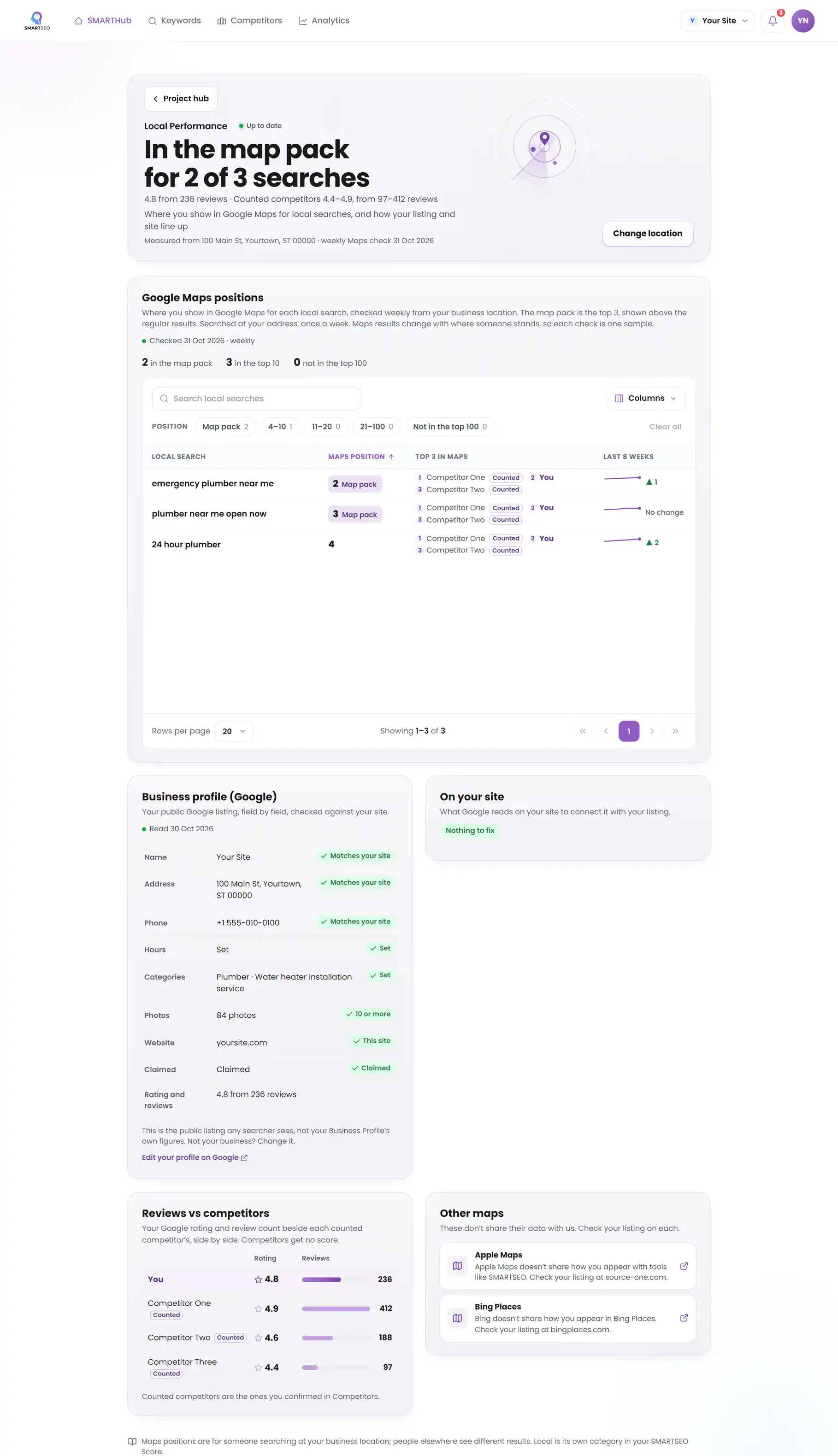
SMARTSEO’s Local Performance module does this weekly. It checks where you show in Google Maps for your local searches as a searcher at your business’s address sees it, compares your public Google listing field by field with your site, and sets your reviews beside the competitors you track. It never guesses your location: you tell it whether customers visit you or you serve an area, and where. Apple Maps doesn’t share how businesses appear with tools like ours, so we link to it rather than show a figure.
The problems we find most often
Each of these is a check SMARTSEO runs on every scan, in the words the app uses. Open one to see what triggers it and how to fix it.
WarningYour name and phone don't match everywhere
- What triggers it
- Your business name or phone number on the site doesn’t match your Google listing.
- Why it matters
- Google checks that a business is who and where it says it is. A phone or name that differs between your pages, your structured data and your Google listing makes that harder, and costs calls from people who dial the wrong one.
- How to fix it
- Use one name and one phone number everywhere: on your pages, in your LocalBusiness structured data and on your Google Business Profile.
NoticeYour opening hours aren’t on your site
- What triggers it
- Your opening hours aren’t written anywhere on your site.
- Why it matters
- Opening hours are one of the first things people check before they visit or call. Structured data lets Google read them from your site as well as your listing.
- How to fix it
- Add openingHours (or openingHoursSpecification) to your LocalBusiness structured data, and keep it the same as your Google listing.
NoticeNo page says where you are or what area you serve
- What triggers it
- No page on your site says where you are or which area you serve.
- Why it matters
- A page that gives your address (or the area you serve), with a map, is what people and Google look for to judge whether you are near them.
- How to fix it
- Add a location or contact page with your address or service area, your phone and an embedded map.
NoticeHomepage has no Organization markup
- What triggers it
- Your homepage has no Organization (or LocalBusiness) markup.
- Why it matters
- Organization markup on your homepage tells Google your business name, logo and address in a form it can use directly. Markup added by a script after the page loads isn't visible to us.
- How to fix it
- Add Organization (or a more specific type such as LocalBusiness) with your name, logo and URL.
Questions people ask
What is the local pack?
The map and the short list of businesses Google shows above or among the results for searches with local intent, like “plumber near me” or “dentist [city]”. Places in it get a large share of the calls and direction requests for that search.
Do I need a Google Business Profile?
If customers visit you, or you visit them, yes. It is the listing behind your place on Google Maps and in the local pack, and Google takes your name, address, phone, hours and categories from it. It is free.
Do reviews affect local rankings?
Google says the number of reviews and their ratings play a part in local ranking, alongside how relevant your listing is to the search and how far you are from the searcher. Reviews also decide whether people choose you once they see you.
Why do I rank differently from my office and my phone?
Local results depend on where the search is made. A search from your street and one from across town can show different businesses. That is why SMARTSEO checks your Maps position as a searcher at your business's own address, one sample a week.
What we do for you
- Google Business Profile cleanup: categories, hours, services and photos
- Consistent name, address and phone across your site and listings
- Location and service-area pages that answer local searches
- A local keyword plan from the searches that bring you calls